Uploading Metadata to the IFCB Dashboard
Source:vignettes/ifcb-dashboard-metadata.Rmd
ifcb-dashboard-metadata.RmdThis guide describes how to upload the yearly metadata file to the IFCB dashboard so that cruise numbers are correctly assigned to samples. This step is required before using the Cruise selection mode in the standard AlgAware workflow (see Standard AlgAware Workflow).
Network requirement: The IFCB dashboard is hosted on an internal SMHI server. You must be connected to the SMHI office network or SMHI VPN to access it. This requirement also applies to the standard AlgAware workflow.
Background
Cruise numbers are assigned to IFCB samples via a metadata CSV file
that is generated automatically once per hour on the SMHI file server —
but only when new samples are available. The file reads a
cruise_numbers.txt configuration file to match cruise
numbers with time intervals.
After new cruise information has been added to
cruise_numbers.txt, the updated metadata file must be
uploaded to the dashboard manually. Without this step, samples from a
new cruise will appear with the placeholder cruise number
SVEA_YYYY_NA instead of the correct cruise identifier.
Prerequisites
- Access to the SMHI network (office or VPN)
- An account on the IFCB dashboard with Settings access
- The yearly metadata file for the current year, located on the utv file server at:
/data/utv/ifcb/work/data/ifcbdb_metadata/ifcb_dashboard_metadata_Svea_YYYY.csvReplace YYYY with the current four-digit year.
Do not open or edit the metadata file in Excel.
Excel may silently change the file encoding, which will corrupt the
upload. If you need to inspect or edit the file (e.g. to add a missing
cruise number to cruise_numbers.txt), use a plain-text
editor and separate fields with a tab character.
Step-by-step: uploading metadata
1. Log in to the IFCB dashboard
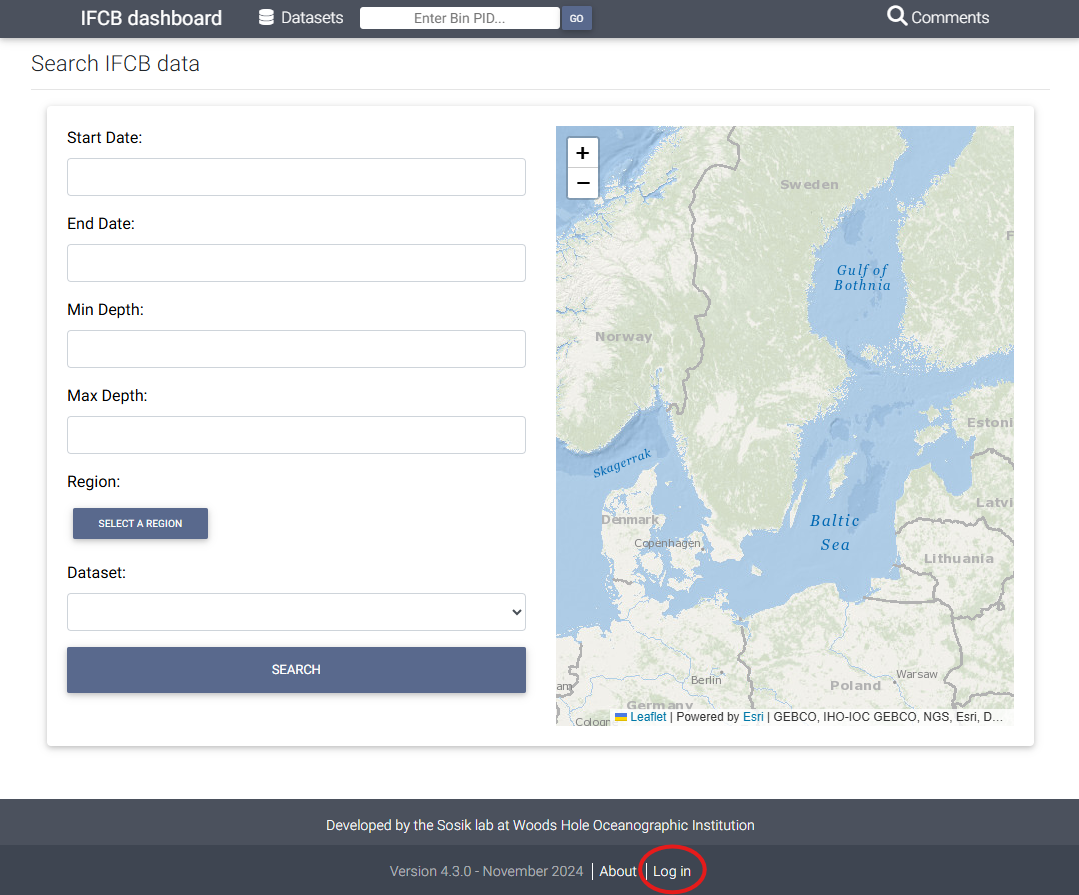
Navigate to http://ifcb-dashboard-utv.smhi.se/ in your browser.
If you are not already logged in, click the Log in link at the bottom of the page.
2. Open Settings and click Upload Metadata
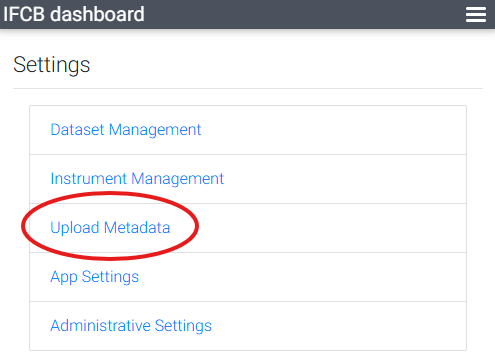
After logging in, click the ⚙ Settings menu (cogwheel icon, top right). On the Settings page, click Upload Metadata.
3. Select the file and upload
On the Upload Metadata page:
- Click Browse and locate the metadata file for the
current year on the utv file server:
/data/utv/ifcb/work/data/ifcbdb_metadata/ifcb_dashboard_metadata_Svea_YYYY.csv - Click UPLOAD.
A confirmation message will appear once the upload is complete:
Complete. X bins modified, Y error(s)
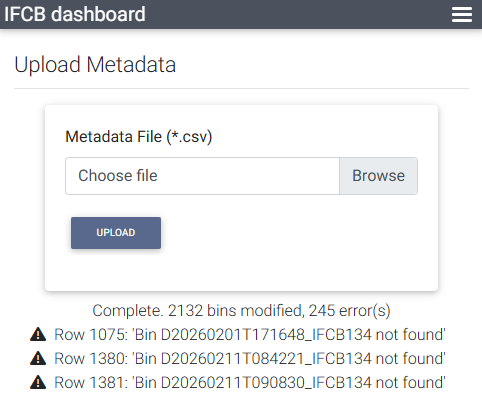
The number of modified bins depends on how many new samples have been collected since the last upload.
“Bin not found” errors are expected and can be ignored. These occur when the metadata file references sample bins that have not yet been ingested into the dashboard (e.g. from deleted samples).
Step 4 (optional): verify that the cruise appears
To confirm the upload worked:
- Go to the dashboard home page and click on the RV Svea dataset.
- Click Filter.
- Open the Cruise dropdown — the latest cruise number should now be listed.
If the cruise is still missing, proceed to the troubleshooting section below.
Troubleshooting
| Symptom | Likely cause | Action |
|---|---|---|
Cruise shows as SVEA_YYYY_NA
|
Cruise number not in cruise_numbers.txt
|
Add the cruise number to the end of cruise_numbers.txt
using a text editor (tab-separated fields). Wait up to one hour for the
metadata file to regenerate, then re-upload. |
| Cruise not listed after upload | Metadata file not yet regenerated | Wait up to one hour and re-upload, or contact the maintainer. |
| Upload fails / dashboard unreachable | Network or server issue | Check SMHI VPN connection; contact the maintainer if the server appears down. |
| No cruise number available | Metadata workflow cannot be resolved in time | Use Date Range selection in the AlgAware app instead of Cruise. |
For persistent issues, contact Anders Torstensson (maintainer).
Notes for maintainers
- The metadata file is regenerated once per hour by a scheduled script, provided new samples are available.
- The script reads
/data/utv/ifcb/work/data/ifcbdb_metadata/cruise_numbers.txtto map cruise numbers to time intervals. - Adding a new cruise season requires a manual edit
of
cruise_numbers.txt— append a new line at the end of the file with tab-separated fields. This step is easy to forget and will result inSVEA_YYYY_NAassignments until it is done. - If the scheduled script itself fails, it requires maintainer intervention to restart.